

Technical SEO is the quiet work that helps your site show up online. It focuses on the core setup of your site so search engines can find, crawl, read, and index your pages without friction.
Without a strong technical base, great content and clever marketing struggle to gain traction. Think of it like tuning the engine and fixing the aerodynamics before adding racing stripes.
For e-commerce, especially Shopify stores, smart technical SEO helps turn visitors into customers. If you want to improve your store’s setup, a focused Shopify SEO agency can be a valuable partner.
Simply put, technical SEO helps your site show up clearly to both search engines and people. It tackles the behind-the-scenes parts that decide how easily your site can be reached, read, and ranked. These choices affect speed, usability, and search results. It’s like building a clean, safe, and welcoming house that works well for visitors and bots alike.
What Is Technical SEO and How Does It Impact Website Performance?
Technical SEO is the base layer of all SEO work. It is the process of improving a site’s backend so search engines can crawl, render, and index pages efficiently. This means making it easy for search engines to discover and understand your content, which leads to better visibility and rankings.
The effect on performance is big: a sound setup usually means faster load times, strong security, and easy navigation, which helps users and rankings.
Without it, sites face crawl waste, rendering errors, and indexing delays. These problems can cause ranking swings, lower traffic, and a poor user experience. The goal is to remove hidden blockers so search engines can see the real value of your pages. A solid technical base improves speed, strengthens security, and helps conversions through specific changes.
What Differentiates Technical SEO from On-Page and Content SEO?
To understand technical SEO, it helps to separate it from on-page and content SEO. All three work together, but they focus on different areas. Technical SEO improves the structure and systems of a website so search engines can crawl and index it well. It deals with how your site works and how bots move through it.
On-page SEO focuses on each page. It covers keyword use, meta tags, header tags, internal links inside the copy, and content layout to improve clarity and engagement. Its goal is to make a page a strong match for a search query. Content SEO focuses on creating useful, relevant content that fits what users want. It aims to provide value, boost engagement, and win rankings.
Think of technical SEO as building the house, on-page SEO as arranging each room, and content SEO as adding helpful, engaging information. Each has an important job, but technical SEO keeps everything standing.
Why Do Search Engines Rely on Technical SEO?
Search engines sort and show the web at scale. They lean on technical SEO because it gives clear signals about how to access and read content. Without those signals, they struggle to load, interpret, and rank pages. It’s like trying to read a book with missing pages and no table of contents — a situation teams like NON.agency often resolve through structured technical audits.
Technical SEO helps search engines use crawl budget wisely, focus on important pages, and judge relevance and trust. Signals like site speed, mobile readiness, and HTTPS help them decide quality.
If a site is slow, hard to use on mobile, or not secure, rankings will likely drop because users have a worse experience. Good technical SEO helps bots reach, read, and rank content without running into structural problems while also improving the visit for users.
Why Is Technical SEO Important for High-Performing Websites?
Technical SEO supports almost every success story online. A site might have great content and design, but with a weak technical base, it won’t reach its full potential for rankings or engagement. Technical choices influence how fast search engines find and understand your pages, which affects how many people see your brand.
This is also about people, not just algorithms. A fast, safe, and accessible site builds trust, keeps users on the page, and leads to more actions. On the other hand, bugs, slow speed, and poor mobile layouts push people away and waste opportunities. Technical SEO acts as the bridge between your site’s value and how easily others can discover it.
What Are the Business and Search Visibility Benefits?
Strong technical SEO does more than lift rankings; it drives real business results and better visibility. First, it helps more of your pages appear in search. If search engines can’t reach a page, it won’t rank, no matter how good the content is. That means lost traffic and lost revenue.
It also improves user experience, which Google pays close attention to. Fast, mobile-friendly pages with clear navigation help usability, lower bounce rates, and raise conversions.
When users have a good visit, they browse more and are more likely to buy. That engagement sends positive signals back to search engines. A setup that scales well also helps new pages and features fit into your site cleanly, keeping growth steady as you expand.
What Are the Most Influential Technical SEO Ranking Factors?
For search rankings, several technical factors carry the most weight. These metrics and settings help search engines judge your site’s structure, access, and quality. Improving these areas can lead to higher visibility.
Leading the list is crawlability, which is how well search engines can find and access pages. Clean XML sitemaps, a focused robots.txt, correct canonical tags, and a strong internal linking plan help spread crawl activity and avoid orphan pages or index bloat. Next is site structure, which covers how content is organized, linked, and grouped. A clear structure helps search engines understand topics and context.
HTTPS (SSL/TLS Certificate) is a must today. It encrypts traffic and signals trust. Sites without it can face indexing and trust issues. Handling HTTP status codes correctly-using 301 redirects for permanent moves and fixing 404s-helps avoid crawl waste and broken journeys. Finally, page speed (tied to Core Web Vitals) and mobile-friendliness matter a lot. Responsive design and smooth mobile interactions are key pillars of a winning technical SEO plan.
What Are the Core Elements of Technical SEO Best Practices?
Looking at the core elements of technical SEO is like reviewing a building plan. Each piece, even small ones, adds to stability, speed, and function. These are not optional tips-they are basic needs for sites that want strong results in search. They touch how content is set up, how fast it loads, and how safely it is delivered.
Following these practices turns a site into a reliable system that works well for both bots and people and gives a great visit. From layout to structured data, getting these right helps you get the most out of your site and keep performance high.
Build a Logical and Scalable Site Architecture
A clean site structure is the base of SEO wins, especially on large sites. It decides how pages connect and how both users and bots move around.
A clear structure helps search engines find and rank content and helps people browse with ease. Aim for a simple hierarchy where important pages are a few clicks from the homepage.
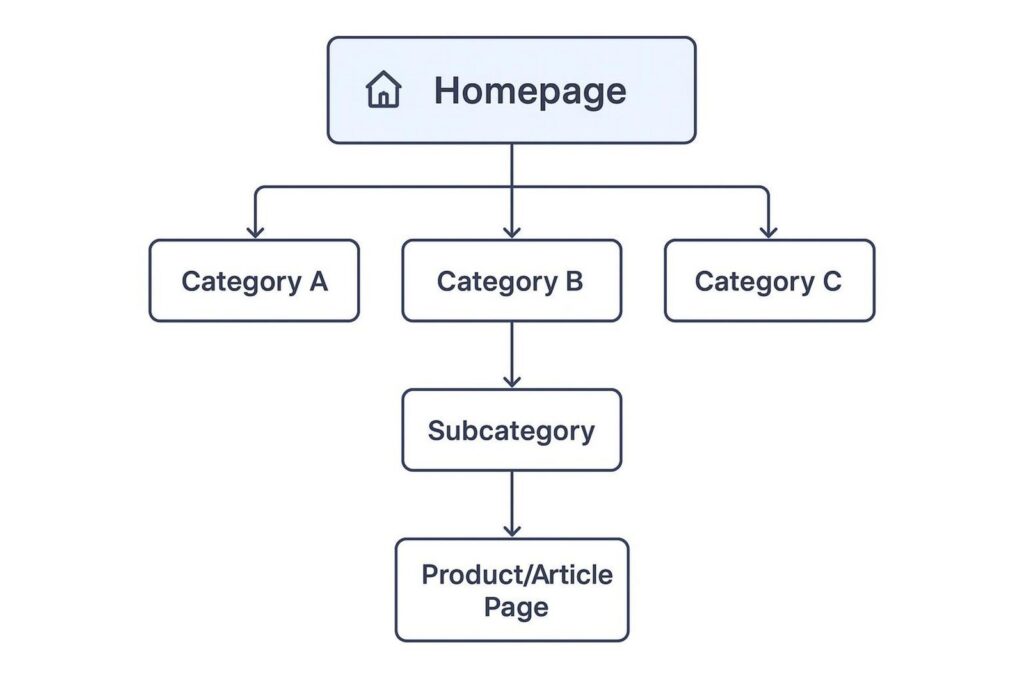
Use clear categories and subcategories, keep click depth low, and make sure key pages are reachable. A common model is Homepage → Category → Subcategory → Page, supported by internal links and consistent URLs. This setup improves discoverability, spreads ranking signals, and avoids orphan pages that are hard to find.
Make Crawlability and Indexability Work Well
To show up in search, your pages must be crawled and indexed. Crawlability is how easily bots can access pages. Indexability is whether those pages are added to search databases. If either fails, your content stays hidden.
Guide bots with care. Use robots.txt to say which areas to crawl or skip, saving crawl budget for pages that matter. XML sitemaps act like a roadmap, listing pages you want indexed. Keep an eye on Google Search Console’s Coverage report to spot and fix crawl and index issues so your content appears in results.
Submit XML Sitemaps and Configure Robots.txt
XML sitemaps and robots.txt work together to direct crawlers. An XML sitemap lists important URLs and shows structure, which helps big or complex sites where some pages are hard to reach via links alone. Submit your sitemap in Google Search Console so Google can find and understand your pages.
<?xml version=”1.0″ encoding=”UTF-8″?>
<urlset xmlns=”http://www.sitemaps.org/schemas/sitemap/0.9″>
<url>
<loc>https://www.example.com/</loc>
<lastmod>2024-01-01</lastmod>
<changefreq>daily</changefreq>
<priority>1.0</priority>
</url>
<url>
<loc>https://www.example.com/category/product-1</loc>
<lastmod>2024-01-02</lastmod>
<changefreq>weekly</changefreq>
<priority>0.8</priority>
</url>
</urlset>
The robots.txt file sits in your site’s root and tells bots what they can and can’t crawl. A good setup avoids wasting crawl budget on low-value pages (like login or filtered URLs), protects sensitive areas, and points bots to your best content. Review robots.txt regularly so you don’t block important pages by mistake, which can hurt visibility.
User-agent: Googlebot
Disallow: /admin/
Disallow: /private-content/
User-agent: *
Disallow: /admin/
Allow: /
Sitemap: https://www.example.com/sitemap.xml
Optimize URL Structure and Parameters
Short, descriptive, and consistent URLs help both users and search engines. Good URLs are easy to read, include relevant terms, and reflect the site’s hierarchy. Keep them short and avoid unnecessary parameters. For example, example.com/category-name/product-name is far better than long strings of random characters.
On large sites, filters can cause duplicate URLs. If many parameter combos generate similar pages, search engines may not know which to index. Use canonical tags to point to a preferred version or ask bots to ignore certain parameters via robots.txt. Keep related pages together in logical folders (e.g., /spain/madrid/) to help clarity and crawling.
Prevent and Fix Duplicate Content Issues
Duplicate content-same or very similar copy across pages or domains-can weaken your SEO. Google usually doesn’t penalize it directly, but it can cause confusion over which version to rank, split link equity, and waste crawl budget. This often happens on large sites where unique content for every page is hard to maintain.
Plan ahead and fix duplicates. The best path is unique content per page. When that’s not practical, add canonical tags to point to the main version. You can also use 301 redirects to merge similar pages or block low-value duplicates with robots.txt or noindex. Tools like Semrush’s Site Audit help spot duplicates so you can fix them at scale.
Use Canonical and Noindex Tags Appropriately
Canonical and noindex tags give precise control over indexing, especially when pages are similar or low priority. Using them correctly keeps your index clean.
A canonical tag (rel=”canonical”) marks the preferred version when multiple pages share similar content. It helps avoid duplicate issues from parameters, product variants, or syndicated content. This consolidates signals to the chosen URL.
A noindex tag (<meta name=”robots” content=”noindex”>) tells search engines to skip indexing a page. It’s useful for thank-you pages, internal search results, login pages, or outdated promos. Pair it with follow if you still want link equity to pass. Use with care; a misplaced noindex on an important page can hurt visibility. Review these tags in Google Search Console to catch mistakes early.
Address 404 Errors and Set Up Redirects
404 pages (page not found) hurt users and SEO. Large sites often get 404s from outdated links, deleted pages, or typos. These dead ends frustrate users, waste crawl budget, and can weaken backlinks that point to removed pages.
Regularly scan for 404s with Google Search Console, Screaming Frog, or Semrush’s Site Audit. Fix them by updating internal links, removing dead URLs from sitemaps, and setting 301 redirects for permanently moved or retired pages. A 301 redirect sends users and bots to the new, relevant URL and preserves link equity. Use 302 only for temporary moves. After adding redirects, update internal links to point straight to the final URL to avoid redirect chains.
# .htaccess rule for a single 301 redirect
Redirect 301 /old-url.html https://www.example.com/new-url.html
Implement Responsive Mobile Optimization
Mobile now leads the way, and Google uses mobile-first indexing. If your mobile site is weak, your rankings can suffer across devices.
Responsive design adapts layout and features to different screens. Use flexible grids, srcset for images, and the right viewport settings. Make buttons and menus easy to tap, use readable font sizes, and add space around interactive elements. Avoid intrusive pop-ups on mobile. Test often with Google’s Mobile-Friendly Test and PageSpeed Insights to keep mobile usability strong.
Improve Page Speed and Core Web Vitals
Page speed affects engagement, rankings, and conversions. Slow pages drive people away and send negative signals to search engines. Google treats speed as a ranking factor on both mobile and desktop.
Core Web Vitals focus on three key metrics. Targets and meanings:
| Metric | What it measures | Target |
| Largest Contentful Paint (LCP) | How fast the main content loads | 2.5s or less |
| First Input Delay (FID) | How quickly the page reacts to first input | < 100 ms |
| Cumulative Layout Shift (CLS) | Visual stability during load | 0.1 or less |
To improve these, compress and lazy-load images, use WebP or AVIF, enable server caching, use a CDN, and minify HTML, CSS, and JS. Tools like PageSpeed Insights and GTmetrix point out bottlenecks and suggest fixes.
Use HTTPS for Site Security
Online security matters, and HTTPS is the standard. HTTPS encrypts data between the browser and your server, protecting logins, personal info, and payments.
Google has used HTTPS as a ranking signal since 2014. Browsers flag HTTP sites as “Not secure,” which can hurt trust and engagement. To add HTTPS, install an SSL/TLS certificate. Many hosts include this, and Let’s Encrypt offers free options. After install, serve all pages over HTTPS and add 301 redirects from HTTP to HTTPS to keep links and traffic flowing to the secure version.
# .htaccess rule to enforce HTTPS across the site
RewriteEngine On
RewriteCond %{HTTPS} off
RewriteRule ^(.*)$ https://%{HTTP_HOST}%{REQUEST_URI} [L,R=301]
Use Structured Data and Schema Markup
Structured data (schema markup) helps search engines understand what’s on a page. By adding JSON-LD code, you give clear hints about your content so search engines can show rich results.
Schema can produce rich snippets like ratings, prices, dates, and FAQs, which can boost click-through rates. Popular types include Article, Product, Review, FAQ, Event, and Organization. Pick schema that fits your content. Tools like Google’s Structured Data Markup Helper or CMS plugins can speed setup. Validate with Google’s Rich Results Test and watch the Enhancements reports in Search Console to check recognition and performance.
<script type=”application/ld+json”>
{
“@context”: “https://schema.org”,
“@type”: “Product”,
“name”: “Supreme Wool-Blend Overcoat”,
“image”: [
“https://example.com/photos/1×1/photo.jpg”,
“https://example.com/photos/4×3/photo.jpg”,
“https://example.com/photos/16×9/photo.jpg”
],
“description”: “A classic single-breasted overcoat, crafted from a premium wool blend for warmth and a soft feel.”,
“sku”: “044631078-001”,
“mpn”: “925872”,
“brand”: {
“@type”: “Brand”,
“name”: “Example Apparel”
},
“review”: {
“@type”: “Review”,
“reviewRating”: {
“@type”: “Rating”,
“ratingValue”: “4.4”,
“bestRating”: “5”
},
“author”: {
“@type”: “Person”,
“name”: “Jane D.”
}
},
“offers”: {
“@type”: “Offer”,
“url”: “https://example.com/product/wool-overcoat”,
“priceCurrency”: “USD”,
“price”: “199.99”,
“itemCondition”: “https://schema.org/NewCondition”,
“availability”: “https://schema.org/InStock”
}
}
</script>
Optimize Internal Linking and Breadcrumb Navigation
Internal linking and breadcrumbs help users and bots move through your site. A strong internal linking plan connects related pages, spreads PageRank, and highlights priority content. It also reduces the chance of orphan pages that bots may miss. Google uses these links to find and index pages, so a smart structure helps rankings.
Breadcrumbs show where a user is (e.g., Home > Category > Subcategory > Page). They aid navigation and reinforce hierarchy for search engines. They are especially helpful on large sites like e-commerce stores where users can go deep into categories. Breadcrumbs also support internal linking by creating clear paths across the site.
Enable Proper Pagination and Faceted Navigation
Large sites-e-commerce, news, or big blogs-need good systems for large sets of pages. Pagination and faceted navigation each solve different problems and need careful handling.
Pagination splits long lists into pages (Page 1, Page 2, etc.). Use it for categories, search results, or archives. Let search engines index paginated pages and give each a self-referencing canonical tag. This is often better than infinite scroll, which can hide content from crawlers.
<link rel=”canonical” href=”https://example.com/category?page=2″ />
Faceted navigation lets users filter by size, color, brand, and more. It’s great for users, but it can create many low-value URL variations. Use canonical tags to point similar filtered URLs to a main version. Disallow low-value filters in robots.txt or use noindex where needed. The aim is rich filtering for users without flooding search engines with duplicate pages.
# Block crawling of faceted navigation URLs to save crawl budget
User-agent: *
Disallow: *?color=
Disallow: *?size=
Disallow: *?brand=
Make Your Website Accessible to All Users
Accessibility helps everyone, including people with disabilities and users of different languages. It also supports Page Experience goals and aligns with WCAG guidelines, which helps usability and search performance.
Technical steps include using semantic HTML (<header>, <nav>, <main>, <article>) so screen readers can parse structure. Add helpful ARIA attributes, descriptive alt text for images, and solid color contrast. Support keyboard navigation and set the correct language attributes. Tools like Google Lighthouse can produce full accessibility reports, flagging missing landmarks or bad HTML. Better accessibility broadens your audience and improves the experience for all visitors.
How to Execute Advanced Technical SEO Strategies
After you nail the basics, many sites need advanced work-especially big, dynamic, or high-traffic sites. These tactics go deeper into how search engines interact with your setup and how performance choices affect visibility. You may need stronger skills in crawling behavior, performance tuning, and sometimes server settings.
From tightly managing how bots crawl to studying server logs for patterns, these steps help you squeeze more results from your site. They keep even very large sites search-friendly, scalable, and ready to grow in an always changing search scene.
Optimize Crawl Budget for Large-Scale Websites
On massive sites, crawl budget can make or break visibility. Search engines decide how often and how deep they crawl a site. If budget is spent on low-value pages, important content may be skipped or delayed. Edward Currie, author of “Technical SEO Best Practices for Large Websites,” stresses the importance of crawl budget for getting key pages indexed.
Guide bots to high-value pages. Strengthen internal linking to top product or service pages, list those URLs in your XML sitemap, and link them in menus where it makes sense. Remove or de-index pages that add little value. Pages like login screens, filters, and duplicates from parameters may need rework, consolidation with redirects, or blocking with robots.txt or noindex. Also, speed matters: slow servers reduce crawl frequency, so improve server response and caching.
Perform Log File Analysis to Identify Crawl Issues
Log file analysis shows exactly how bots use your site. Server logs record each crawler request. Reviewing them reveals crawl patterns, errors, and wasted budget.
Find which pages bots visit often, which they rarely or never touch, and where they spend time on low-value URLs. Access logs via your host’s tools (cPanel, Apache, Nginx) or with software like Screaming Frog’s SEO Log File Analyser. Then act: block junk URLs in robots.txt, add links to guide bots to priority pages, and remove redirect chains. Regular log reviews help Google crawl the right pages and lift indexing.
66.249.66.1 – – [25/May/2024:10:15:30 -0400] “GET /products/category/page.html HTTP/1.1” 200 12345 “-” “Mozilla/5.0 (compatible; Googlebot/2.1; +http://www.google.com/bot.html)”
Use Hreflang Tags for Multilingual and International SEO
If you target multiple languages or regions, hreflang tags help search engines show the right version to the right user. They also reduce duplicate issues across localized pages.
Add hreflang in the <head> of each version, with each page referencing all others, including itself. Use correct ISO language and country codes (e.g., en-gb, fr-ca) and add an x-default for a global fallback. Bad mappings can split signals across versions and weaken rankings. Use Google Search Console’s International Targeting report and audit tools to catch mistakes.
Identify and Resolve CMS Limitations Affecting Technical SEO
Your CMS can help or hurt SEO. Some platforms limit speed, URL control, index settings, or schema options. Finding and fixing these limits is important for growing sites.
Review the CMS across key areas: clean URL control, caching/minification/image compression, robots.txt and meta robots access, canonical control, schema support, and redirect management. If limits block needed fixes, you may need to move to a more SEO-friendly platform like WordPress, Shopify (for e-commerce), or Webflow. Workarounds or a platform switch can keep your technical SEO work from being held back.
What Are the Steps for a Full Technical SEO Audit?
A full technical SEO audit is like a health check for your site. It systematically reviews the technical setup and performance to spot hidden problems and new opportunities that affect visibility. This is not a one-time job; it repeats as your site and search algorithms change. The aim is to keep your site strong, fast, and aligned with what search engines expect for best results.
Doing this right needs the right tools, a steady process, and a sharp eye. By following clear steps, you can turn a complex site into a smooth system that bots crawl well and users enjoy.
Select the Best Technical SEO Tools
The tools you use make a big difference. The best technical SEO tools crawl, analyze, monitor, and help fix issues that hurt visibility.
A strong toolkit starts with Google’s free tools. Google Search Console (GSC) shows indexing status, performance, and URL checks. Google Analytics 4 (GA4) tracks user behavior, engagement, and conversions. PageSpeed Insights (PSI) flags speed issues and Core Web Vitals for mobile and desktop. Add platforms like Search Atlas, which offer a full set of features for site audits, internal link analysis, schema checks, and automated fixes. Screaming Frog SEO Spider is great for deep crawls, and structured data testers help validate schema. Combining Google tools with third-party software creates a powerful setup for thorough analysis and fixes.
Conduct Ongoing Monitoring and Troubleshooting
Technical SEO is ongoing work. As your site grows and changes, new issues will appear and can affect rankings and user experience. Regular monitoring helps you stay ahead and keep visibility steady.
Run audits often with tools like Search Atlas Site Audit or Semrush’s Site Audit to catch crawl, index, and Core Web Vitals problems. Watch Google Search Console’s Coverage and Core Web Vitals reports for errors and shifts. Use tools with live bot tracking to see if priority pages get crawled. Set alerts for downtime and missing pages so you can act fast. With steady monitoring and quick fixes, your site can adapt to changes and keep performing well.
Future-Proofing: Maintaining Technical SEO Health for Sustained Growth
Search engines change often, and yesterday’s advice can get old fast. To keep growing, build a flexible technical base that holds up over time. You don’t need to predict every update. Focus on a setup that can adapt and keep performance high. Build a habit of steady improvements and quick adjustments so your site stays strong for years.
Think of technical SEO as ongoing. Keep learning, review often, and adjust your approach as needed. With this mindset, your site can thrive in an always changing online space.
Continuous Auditing and Adaptation to Algorithm Changes
Google updates can shake up rankings. Regular audits and updates to your setup are a must for steady growth. Technical work is never “done,” and new needs can appear as your site grows or algorithms shift.
Set a schedule for audits-quarterly for most, more often for very large sites. Use advanced tools to catch issues with crawling, indexing, Core Web Vitals, and structured data. Study what changes mean for your site, whether it’s new thresholds for speed or stronger focus on mobile and accessibility. Edward Currie highlights that staying on top of technical details helps visibility, crawling, and user experience. By watching performance, reading changes, and adjusting your plan, you keep your site aligned with search expectations and keep traffic and conversions moving upward. This proactive approach turns risks into chances for ongoing improvement and long-term success.