

Most music tools assume you already know what you’re doing: you have a DAW template, a sound library, a structure in mind. But a lot of creators don’t start there. They start with a scene: a late-night drive, an awkward crush, a montage, a mood board. The problem is that scenes don’t automatically translate into chords, drums, and arrangement.
That’s why a guided AI Song Generator can be useful when you’re stuck at the “I can picture it, but I can’t produce it” stage. It’s not a magic wand. It’s a way to turn narrative intent into a playable draft—fast enough that the original feeling doesn’t evaporate.
The PAS Pattern (Problem → Agitation → Solution) in Real Life
Problem
You have an idea, but the gap between idea and audio is too wide.
Agitation
The longer it takes to hear something, the more the idea changes—or dies. You end up with half-starts and folders named “final_final_3.”
Solution
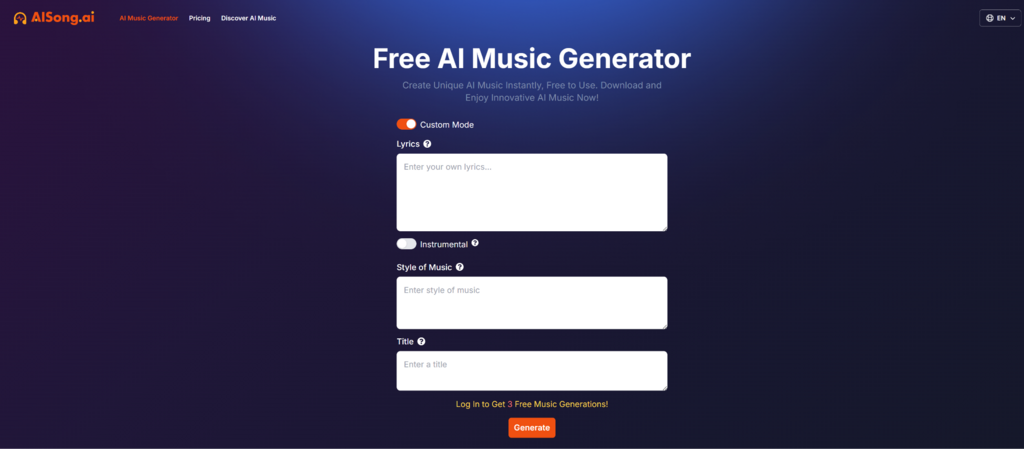
Use a tool that generates a draft quickly, then iterate with intent. AISong.ai positions itself as that kind of “draft engine,” with multiple modes depending on whether you’re starting from lyrics, a concept, or a need for instrumentals.
A “Scene-to-Sound” Workflow You Can Copy
Instead of writing prompts like a shopping list of genres, start from a scene and convert it into constraints.
Step 1: Write the scene in two sentences
Example:
- “A quiet city after rain. Someone walking home with good news they can’t share yet.”
Step 2: Translate the scene into musical constraints
- Tempo: slow to mid (70–95 BPM)
- Energy: gentle rise in the chorus
- Timbre: soft keys, light percussion, warm bass
- Vocal style: restrained, intimate (or no vocals if instrumental)
Step 3: Feed that into your generation mode
Custom Mode
Best when you want the tool to interpret a description.
Lyrics
Best when the words are the “spine” of the idea.
Instrumental
Best when the track is meant to support other content (video, podcast, streams).

How to Write Lyrics That Work Better in Generation
If you pick a lyrics-driven workflow, don’t just paste poetry. Treat it like a usable structure.
A lightweight template
Verse (4–6 lines)
Set the scene. Keep syllable counts roughly similar.
Chorus (2–4 lines)
Repeat the emotional center. Simple language wins.
Bridge (2–4 lines)
Shift perspective. One new image is enough.
Why this helps
Generators tend to behave better when structure is explicit. You’re not forcing creativity—you’re giving it rails.
What “Hands-On” Looks Like Without Pretending It’s Perfect
If you run a small trial on any AI music tool, you’ll likely notice a few patterns:
1. Specific prompts reduce randomness
“Dreamy” is a vibe. “Dreamy, 85 BPM, soft synth pad, sparse drums, wide reverb” is a direction.
2. Iteration is normal
Draft 1 is rarely the keeper. Draft 2 often has the better groove. Draft 4 might nail the chorus lift. The workflow is: generate → take notes → revise prompt → generate.
3. You’ll learn your own “prompt fingerprints”
Over time you find the words that reliably produce your taste: “tight drums,” “airy vocals,” “lo-fi texture,” “clean guitar,” “minimal chorus.”
Comparison Table: Choosing the Right Path for the Track
AISong.ai is one option in a wider toolbox. Here’s how the approaches typically differ.
| Goal | AISong.ai Approach | Traditional DAW Approach | “One-Click” Generator Approach |
| Turn a scene into audio fast | Strong fit (prompt → draft) | Slower setup | Fast, but sometimes less controllable |
| Keep a consistent identity across tracks | Medium (needs prompt templates) | Strong (you control everything) | Medium–Low (variance can be higher) |
| Make instrumentals for content | Strong fit (instrumental mode) | Strong but time-consuming | Often strong |
| Polish for release | Medium (export + refine elsewhere) | Strong | Varies |
Where AISong.ai Feels Useful
For creators who think in stories
If your starting point is “what I want people to feel,” a prompt-based draft tool matches that mental model.
For short-form content
A track that supports a reel, short, or montage doesn’t always need complex arrangement—it needs the right mood fast.
For writers
Lyrics-first creation can be more motivating than learning production basics first.
Limitations You Should Expect
Being realistic makes the results better (and your expectations healthier).
1. Prompt quality drives outcomes
The tool won’t rescue unclear intent. If you’re vague, the output will be vague.
2. Not every generation will be usable
You may generate multiple versions to find one that fits your scene.
3. Licensing and “ownership” nuances exist
AI music terms differ by platform and plan. If your track is for paid distribution or ads, read the terms carefully and keep documentation.
A Calm, Practical Way to Use the Tool
If you approach AISong.ai like a collaborator, not an oracle, it becomes more valuable:
- Start from a scene.
- Convert it into constraints.
- Generate a draft.
- Write down what you like and what you don’t.
- Adjust one variable at a time (tempo, instruments, vocal style).
- Keep the best fragments and reuse your best prompts.
That’s the real payoff: not “effortless music,” but a repeatable way to turn ideas into drafts you can actually build on.